
Loops
A loop is a task that runs its agent again and again, each time in a fresh session, until a list of checks passes. You write down what "done" means, as commands, sentences a judge agent decides, and boxes you tick yourself, and the loop works toward it on its own.
Loop or pipeline
Every task picks how it runs when you create it, under How it runs:
- Pipeline: plan, implement, self review, your approval. For work you will judge by reading it. This is the task pipeline.
- Loop: fresh sessions until sealed checks pass. For work a command can verify: make the tests pass, migrate every call site, get the build green on a new compiler.
A loop needs a git project, since it always works in a worktree of its own. The choice is fixed once the task exists. Loops carry a Loop badge on their card, and All, Pipeline and Loops in the board's toolbar filter by run mode.
Setting up a loop
The goal is the task's description. Everything else is on the Loop tab, the first tab of a loop's task screen. A loop starts with no checks, and cannot start until it has one.
Prepare loop
A loop is only as good as its checks, and the tests they run usually do not exist yet. Prepare loop, on a Planning loop's card or in its empty check list, opens a session with an agent that talks the loop through with you. It works in the loop's own worktree, writes the tests and commits them, and sets the checks, the files to hide and the limits on the task. It does not implement the goal.
The card reads Preparing while it works and Loop prepared when it is done. Read summary shows what it set up, and Join takes you to the session to keep going. Done preparing ends it. Then review the Loop tab and drag the card to Queue.
You can also prepare the tests yourself on a branch and start the loop from it, by checking out that branch in the task's workspace.
Checks
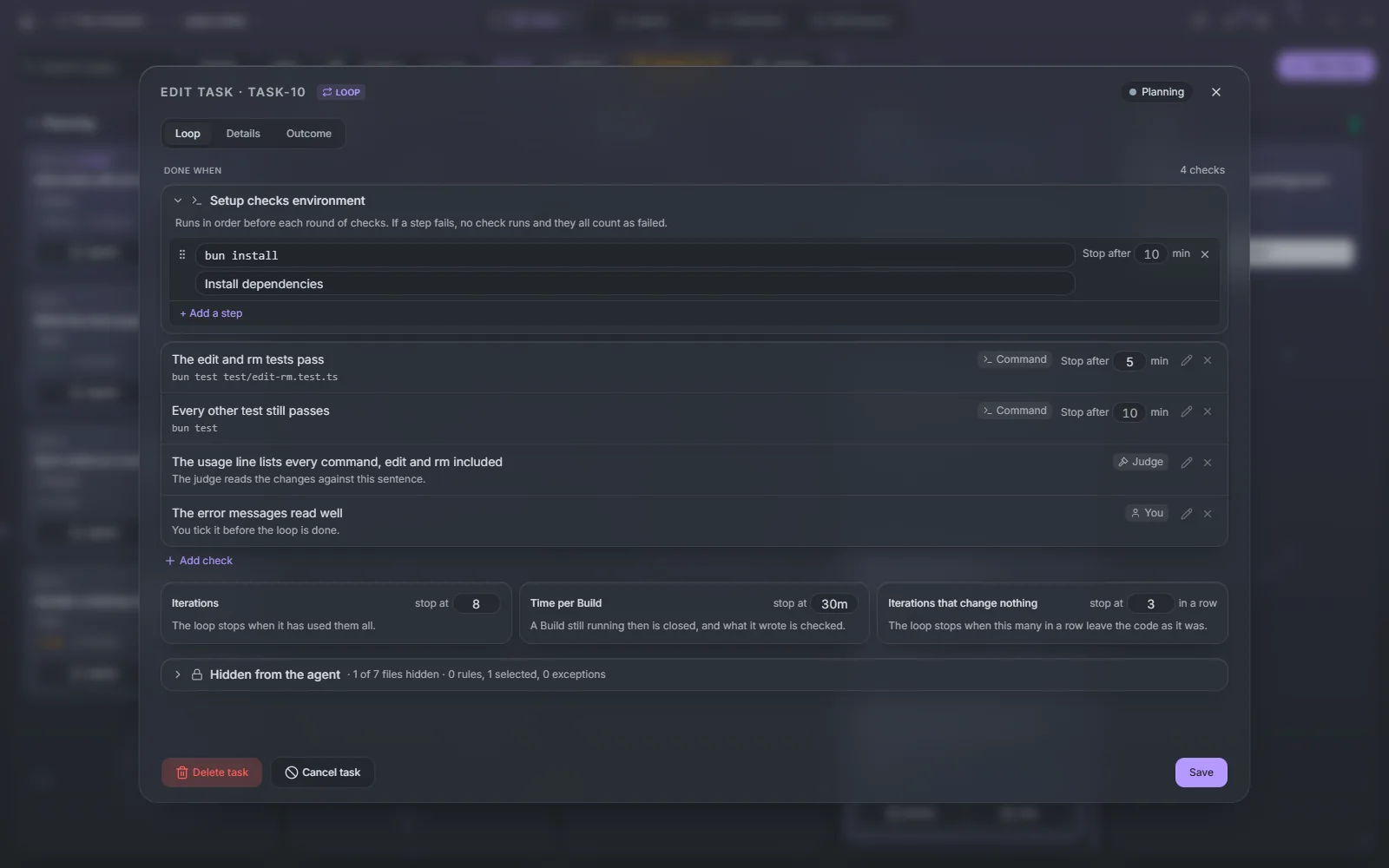
Done when lists the checks. Add check adds one, of three kinds:
| Kind | Passes when |
|---|---|
| Command | The command exits with 0, such as bun run test |
| Judge | A judge agent reads the changes and agrees with your sentence |
| You | You tick it before the loop is done, such as "The output reads well" |
Each check has a sentence saying what it checks, which is also what the agent sees when it fails. A command check stops and fails after 10 minutes, or after the limit in its own Stop after field.
Add a setup step adds commands that run in order before each round of checks, such as bun install, under Setup checks environment. If a step fails, no check runs and they all count as failed.
Hidden from the agent
An agent that can edit its tests can make them pass. So the agent works in a copy of the branch without the files you hide, and the checks and setup steps run with them back in place.
Hidden from the agent takes gitignore-style patterns, such as tests/ or **/*.spec.ts, with ! exceptions, or click the lock of any file in the tree of the loop's branch. A path a check command names is hidden on its own. Maestro flags files a check depends on that are still visible, such as a package.json whose script a check runs. The list is fixed once the loop has started.
Limits
Three limits stop a loop that is not getting anywhere:
| Limit | Default | What happens |
|---|---|---|
| Iterations | 10 | The loop stops when it has used them all |
| Time per Build | 2h | A build still running then is closed, and what it wrote is checked |
| Iterations that change nothing in a row | 3 | The loop stops when this many in a row leave the code as it was |
Checks, steps and limits can be changed at any time except while an iteration or its checks run; Pause to edit halts the loop after the current step. Once a loop has started, Setup on the Loop tab opens these settings.
While it runs
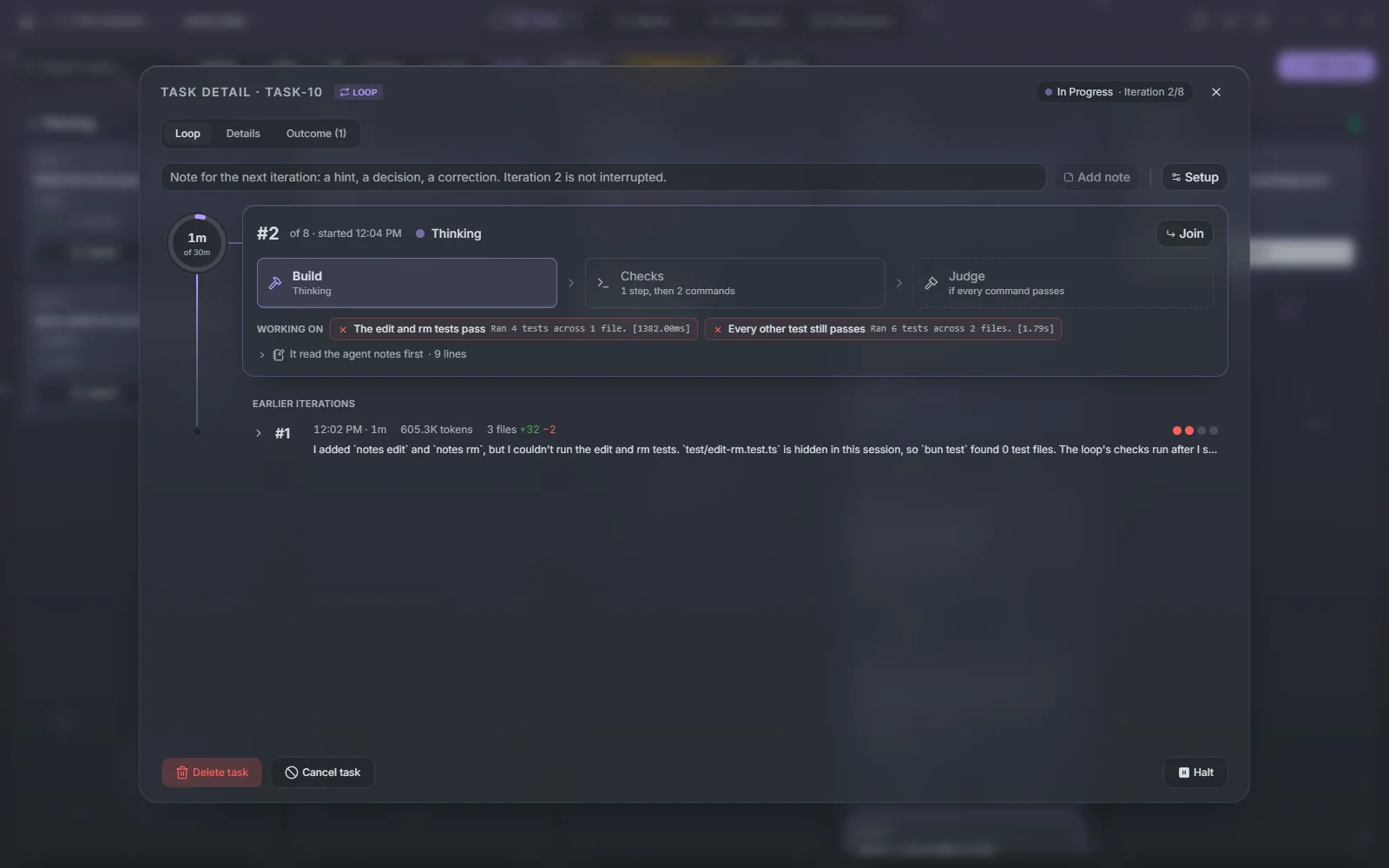
Each iteration is a fresh session, so nothing from the last one clouds the next. It runs Build, where the agent works on the goal, then the Checks. When every command check passes and the loop has judge checks, a judge agent decides those. If anything fails, the next iteration starts with what failed.
Between iterations the agent keeps notes in .maestro/loop/PROGRESS.md in the worktree, never committed: what it tried, what it learned, what is left. The next iteration reads them first.
The Loop tab follows the current iteration step by step: the Build with what it is working on and Join to watch the session, each setup step and check with its command and output, and each judge check with the judge's reasons. Earlier iterations lists the rest, with their checks and outcome. The card shows the iteration, such as Iteration 3/10, and one segment per check.
Write in the note box to steer it. Add note hands a hint or a correction to the next iteration without interrupting the current one.
Halting and resuming
Halt pauses a loop either After this step or Now. A build cut off now is kept as a work-in-progress commit and does not count as an iteration. Resume starts it again, with any note you wrote.
A loop also halts on its own, and the card says why:
- Out of iterations, Stalled when iterations change nothing, or Failing when the last three iterations failed. Raise the limit, change a check, or leave a note, then resume.
- Blocked when the agent cannot go on without you, such as for a decision only you can make. Its question shows on the Loop tab; Resume with this answer passes your answer to the next iteration.
- Flaky check when a check failed, then passed when run again on the same commit. The loop waits rather than spend iterations on it. Fix the test in the loop's worktree or remove the check, then Re-run checks: they run on the worktree as it is and cost no iteration.
- A usage limit, such as 5-hour limit: the refused attempt runs again when the limit resets, without counting.
An agent can also propose a check the list lacks. It shows under Done when as Proposed, with Accept and Reject, and the loop does not finish while one is unanswered.
Start over on a stopped loop clears its iterations, check results and outcome, and keeps its steps, checks, hidden files and limits.
Signing off
When every check except yours passes, the loop moves to Review and the card reads Needs your check. The judge has written a digest of the work from the notes, the iterations and the diff.
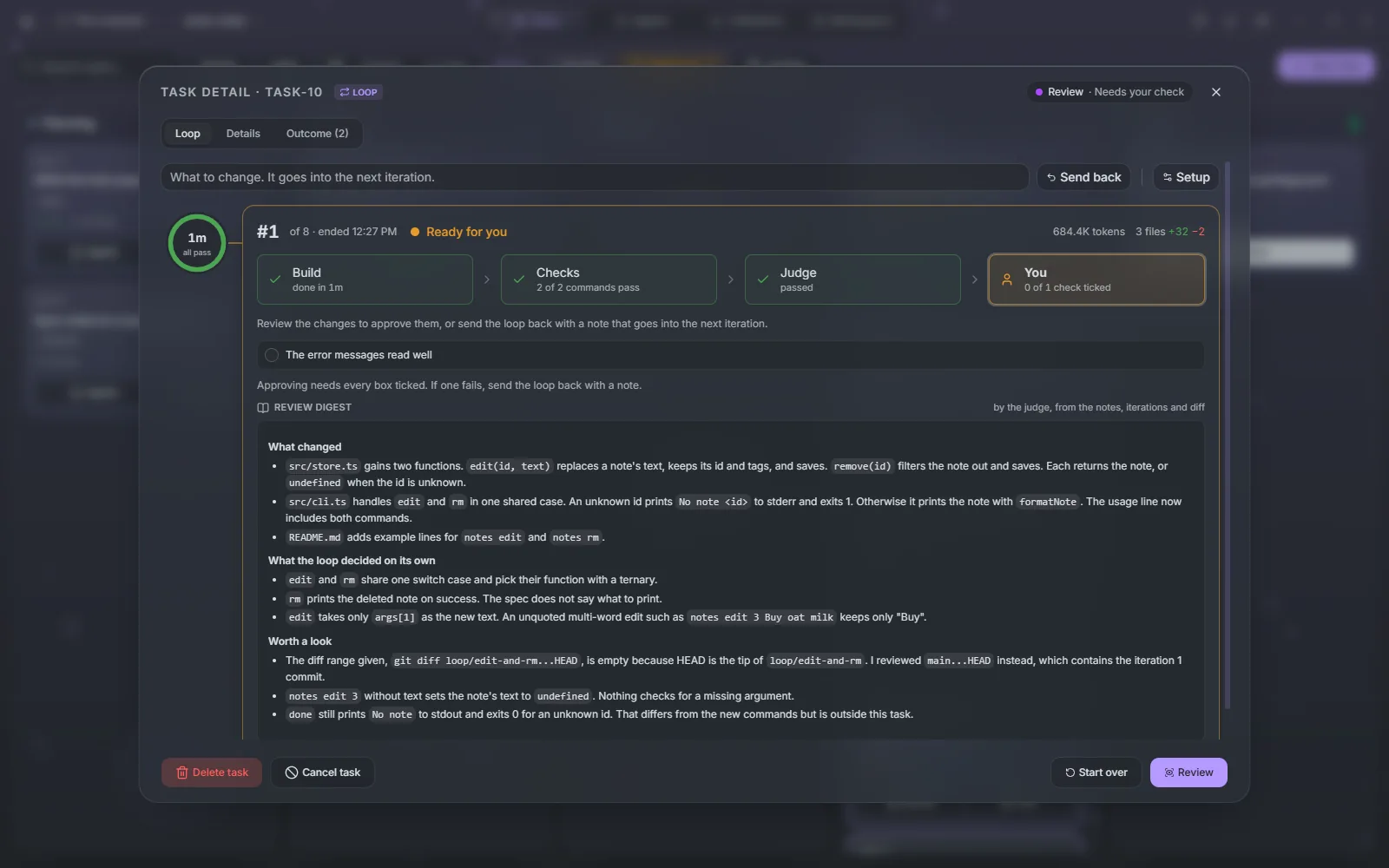
Review opens the diff. Tick each You check on the Loop tab first: Approve stays disabled until every box is ticked. Then the work lands the same way any task does, by merge, push or pull request, and the digest becomes the pull request's description. To ask for more, write what to change and press Send back; it goes into the next iteration.
Agents for loops
Settings → Agents → Task workflow stages has a Loops tab with a profile for each role: Preparation writes the tests and checks with you, Building works toward the goal, and Judging decides the judge checks and writes the digest. Without a profile, Preparation and Building run on the project's default agent, and Judging on Build's agent. A task's Agents button overrides them for that loop.
Waiting on you on the same tab limits how many loops wait on you at once. Once that many wait for an answer or a sign-off, auto mode starts no more queued loops; Start anyway on a queued loop starts it regardless.